

Styling
Use className as the canonical way to style elements. The excelwindClasses utility is available for manual conversions.
import { excelwindClasses } from "@gavin-lynch/excelwind";
<Cell value="Total" className="font-bold bg-blue-600 text-white text-right" /><Cell value="Total" style={excelwindClasses("font-bold bg-blue-600 text-white text-right")} />
Background colors
Use bg-{color}-{shade} to set the cell fill. Colors come from Tailwind’s palette.
Examples:
excelwindClasses("bg-blue-600")excelwindClasses("bg-slate-200")Notes:
- Shaded colors use
100-900where Tailwind defines them. - Solid fills are applied with
pattern: "solid". - If no background class is provided, ExcelJS defaults apply (no fill).
Text colors
Use text-{color}-{shade} to set font.color.
Examples:
excelwindClasses("text-white")excelwindClasses("text-emerald-700")Default behavior:
- If no text color class is provided, Excel uses its default font color.
Font sizes
Sizes map to Excel font size points.
| Class | Size (pt) |
|---|---|
text-xs | 10 |
text-sm | 11 |
text-base | 12 |
text-lg | 14 |
text-xl | 16 |
text-2xl | 20 |
text-3xl | 24 |
text-4xl | 30 |
Font styles
These classes toggle Excel font flags.
| Class | Effect |
|---|---|
font-bold | font.bold = true |
font-italic | font.italic = true |
font-underline | font.underline = true |
Defaults:
- If no font styles are specified, Excel defaults apply.
Alignment
Horizontal and vertical alignment map directly to Excel’s alignment settings.
Horizontal:
text-lefttext-centertext-right
Vertical:
align-topalign-middle(alias:align-center)align-bottom
Wrapping:
text-wrapsetswrapText = truetext-nowrapsetswrapText = false
Defaults:
- If no alignment classes are set, Excel’s default alignment is used.
- If neither
text-wrapnortext-nowrapis set, wrapping behavior remains unchanged.
Borders
Borders are composed from multiple classes:
- Sides:
border,border-t,border-r,border-b,border-l,border-x,border-y - Style:
border-thin,border-thick,border-dotted,border-dashed,border-double - Color:
border-{color}-{shade}
Examples:
excelwindClasses("border border-gray-300")excelwindClasses("border-b border-dashed border-amber-600")excelwindClasses("border-x border-thick")Notes:
- If no border style is specified,
thinis used by default. - Border color uses the same Tailwind palette mapping as text/background.
- If no border color is specified, ExcelJS uses its default line color.
Errors and validation
- Unknown classes throw an error to catch typos early.
- The parser is strict; only the options listed on this page are supported.
Merge order
Styles are merged in this order: column -> group -> row -> cell.
See it in practice
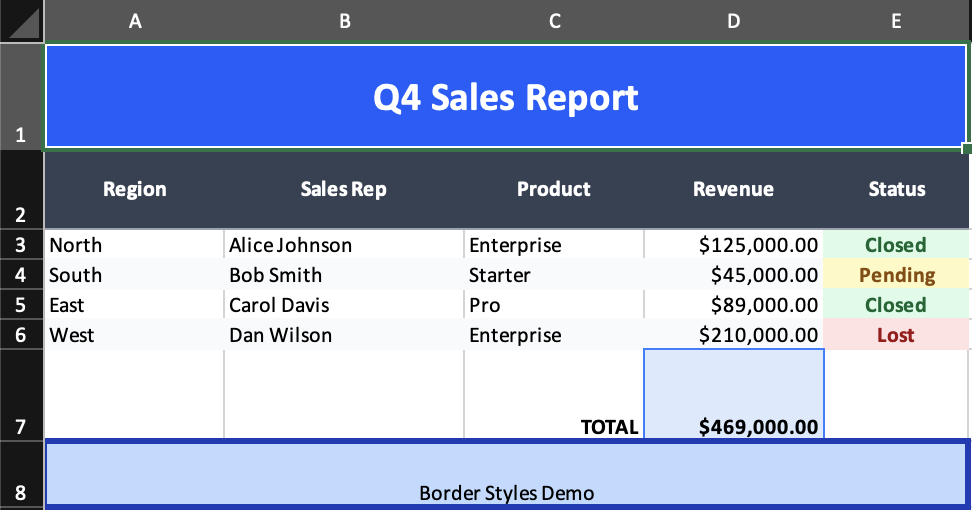
- Source:
examples/02-styling.tsx - Shows title styling, shared header styles, alternating row backgrounds, status pills, and border composition
Related topics
- Properties: what
excelwindClassescan set - Format: number/date formatting
- Formula: cell formulas and cached values
Note: Formatting and formulas are handled by ExcelJS and Excel itself. excelwindClasses only maps style properties and does not interpret format strings or formulas.