

Templates Example
Preview
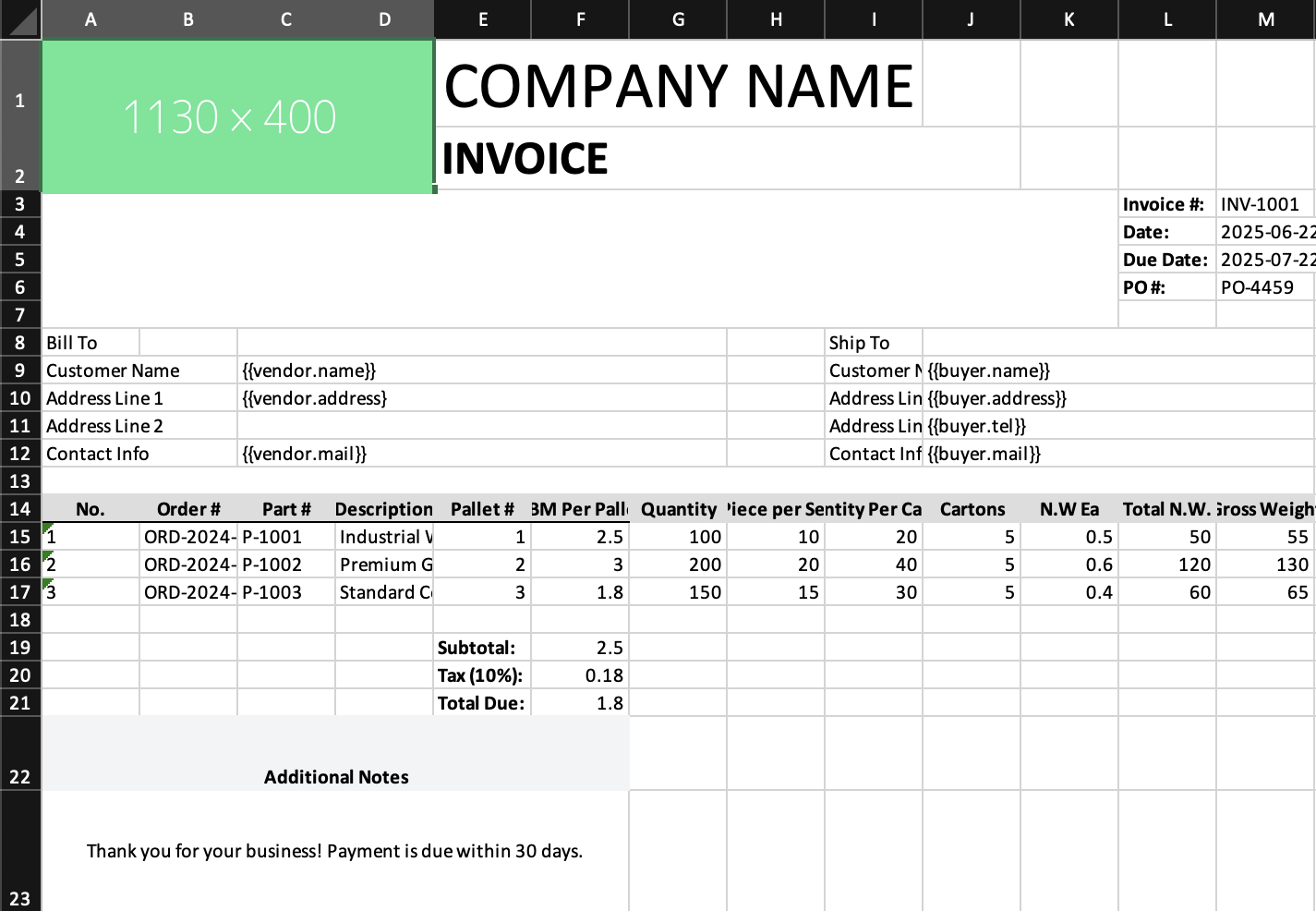
What it demonstrates
- loading a pre-built Excel template
- matching headers to data columns
- duplicating a placeholder row for each data item
- appending additional JSX rows after template output
Why it matters
Templates are the fastest route to branded spreadsheets when layout is easier to design in Excel than in code.
Source
examples/06-templates.tsx
/**
 * Templates Example - Using Excel Template Files
 *
 * This example demonstrates how to:
 * - Load an existing Excel template
 * - Fill in template placeholders with data
 * - Combine templates with programmatic content
 *
 * Templates are useful for:
 * - Complex formatting that's easier to design in Excel
 * - Forms with specific layouts
 * - Reports with company branding
 *
 * Run: npm run example:templates (or pnpm/bun equivalent)
 */

import { writeFile } from 'node:fs/promises';
import { Cell, Group, Row, Template, Workbook, Worksheet } from '../src/components';
import { renderToWorkbook as render } from '../src/renderRows';

// Sample invoice data
const invoiceData = {
  vendor: {
    name: 'Acme Corporation',
    address: '123 Business Ave, Suite 100',
    mail: 'billing@acme.com',
  },
  buyer: {
    name: 'Customer Inc',
    address: '456 Client Street',
    tel: '555-0123',
    mail: 'orders@customer.com',
  },
  columns: [
    { id: 'itemNumber', names: ['No.'] },
    { id: 'orderNumber', names: ['Order #'] },
    { id: 'partNumber', names: ['Part #'] },
    { id: 'description', names: ['Description'] },
    { id: 'palletNumber', names: ['Pallet #'] },
    { id: 'cbmPerPallet', names: ['CBM Per Pallet'] },
    { id: 'quantityPcs', names: ['Quantity'] },
    { id: 'pcsPerSet', names: ['Pcs/Set'] },
    { id: 'quantityPerCarton', names: ['Qty/Carton'] },
    { id: 'cartons', names: ['Cartons'] },
    { id: 'netWeightPerPiece', names: ['N.W. Each'] },
    { id: 'totalNetWeight', names: ['Total N.W.'] },
    { id: 'grossWeight', names: ['Gross Wt.'] },
  ],
  rows: [
    {
      itemNumber: '1',
      orderNumber: 'ORD-2024-001',
      partNumber: 'P-1001',
      description: 'Industrial Widget',
      palletNumber: 1,
      cbmPerPallet: 2.5,
      quantityPcs: 100,
      pcsPerSet: 10,
      quantityPerCarton: 20,
      cartons: 5,
      netWeightPerPiece: 0.5,
      totalNetWeight: 50,
      grossWeight: 55,
    },
    {
      itemNumber: '2',
      orderNumber: 'ORD-2024-001',
      partNumber: 'P-1002',
      description: 'Premium Gadget',
      palletNumber: 2,
      cbmPerPallet: 3.0,
      quantityPcs: 200,
      pcsPerSet: 20,
      quantityPerCarton: 40,
      cartons: 5,
      netWeightPerPiece: 0.6,
      totalNetWeight: 120,
      grossWeight: 130,
    },
    {
      itemNumber: '3',
      orderNumber: 'ORD-2024-002',
      partNumber: 'P-1003',
      description: 'Standard Component',
      palletNumber: 3,
      cbmPerPallet: 1.8,
      quantityPcs: 150,
      pcsPerSet: 15,
      quantityPerCarton: 30,
      cartons: 5,
      netWeightPerPiece: 0.4,
      totalNetWeight: 60,
      grossWeight: 65,
    },
  ],
};

const workbook = (
  <Workbook>
    <Worksheet name="Invoice">
      {/* Use a template file and fill it with data */}
      <Template src="examples/assets/template-merges.xlsx" data={invoiceData} />

      {/* You can add more content after the template */}
      <Row height={30}>
        <Group className="font-bold text-center bg-gray-100">
          <Cell value="Additional Notes" colSpan={6} />
        </Group>
      </Row>

      <Row height={50}>
        <Cell
          value="Thank you for your business! Payment is due within 30 days."
          colSpan={6}
          className="text-center align-center"
        />
      </Row>
    </Worksheet>
  </Workbook>
);

render(workbook).then(async (wb) => {
  const buffer = await wb.xlsx.writeBuffer();
  await writeFile('examples/output/06-templates.xlsx', Buffer.from(buffer));
  console.log('✅ Created examples/output/06-templates.xlsx');
});
Important note
Current template expansion focuses on row-based placeholders. The screenshot still shows non-row placeholders elsewhere in the template, which reflects the current implementation rather than a docs mistake.