

Styling Example
Preview
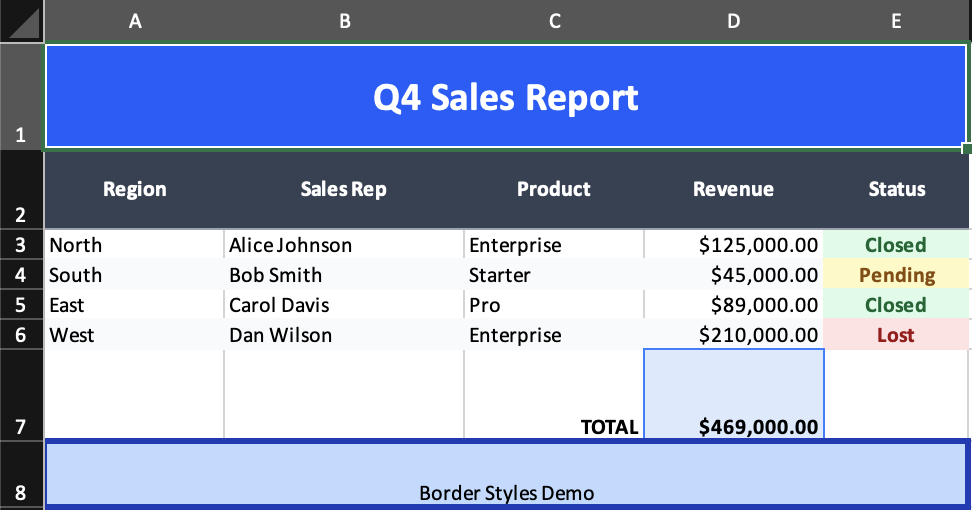
What it demonstrates
classNameas the main styling API- group-level style propagation for headers and row sections
- alignment and border utilities
- formatted numeric columns and totals
Why it matters
This is the best className example in the repo. It shows how far the Tailwind-like utility layer can go before you need raw ExcelJS styles.
Source
examples/02-styling.tsx
/**
 * Styling Example - Tailwind-style Classes for Excel
 *
 * This example demonstrates how to style your spreadsheets using
 * Tailwind-inspired class names via the `className` prop.
 *
 * Supported styles include:
 * - Colors: bg-{color}-{shade}, text-{color}-{shade}
 * - Borders: border, border-{side}, border-{color}-{shade}, border-thick
 * - Typography: font-bold, text-sm, text-lg, text-xl, text-2xl
 * - Alignment: text-left, text-center, text-right, align-top, align-center, align-bottom
 * - Text: text-nowrap
 *
 * Run: npm run example:styling (or pnpm/bun equivalent)
 */

import { writeFile } from 'node:fs/promises';
import { Cell, Column, Group, Row, Workbook, Worksheet } from '../src/components';
import { renderToWorkbook as render } from '../src/renderRows';

const workbook = (
  <Workbook>
    <Worksheet name="Styled Report" properties={{ tabColor: { argb: '4F46E5' } }}>
      {/* Column definitions */}
      <Column width={15} />
      <Column width={20} />
      <Column width={15} />
      <Column width={15} format='"$"#,##0.00' />
      <Column width={12} />

      {/* Title Row */}
      <Row height={40}>
        <Cell
          value="Q4 Sales Report"
          colSpan={5}
          className="font-bold text-2xl text-center align-center bg-blue-600 text-white"
        />
      </Row>

      {/* Header Row */}
      <Row height={30}>
        <Group className="font-bold text-white bg-gray-700 text-center align-center border-b border-gray-400">
          <Cell value="Region" />
          <Cell value="Sales Rep" />
          <Cell value="Product" />
          <Cell value="Revenue" />
          <Cell value="Status" />
        </Group>
      </Row>

      {/* Data Rows with alternating styles */}
      <Row>
        <Cell value="North" className="text-left" />
        <Cell value="Alice Johnson" />
        <Cell value="Enterprise" />
        <Cell value={125000} className="text-right" />
        <Cell value="Closed" className="bg-green-100 text-green-800 text-center font-bold" />
      </Row>

      <Row>
        <Group className="bg-gray-50">
          <Cell value="South" className="text-left" />
          <Cell value="Bob Smith" />
          <Cell value="Starter" />
          <Cell value={45000} className="text-right" />
          <Cell value="Pending" className="bg-yellow-100 text-yellow-800 text-center font-bold" />
        </Group>
      </Row>

      <Row>
        <Cell value="East" className="text-left" />
        <Cell value="Carol Davis" />
        <Cell value="Pro" />
        <Cell value={89000} className="text-right" />
        <Cell value="Closed" className="bg-green-100 text-green-800 text-center font-bold" />
      </Row>

      <Row>
        <Group className="bg-gray-50">
          <Cell value="West" className="text-left" />
          <Cell value="Dan Wilson" />
          <Cell value="Enterprise" />
          <Cell value={210000} className="text-right" />
          <Cell value="Lost" className="bg-red-100 text-red-800 text-center font-bold" />
        </Group>
      </Row>

      {/* Total Row */}
      <Row height={35}>
        <Cell value="" />
        <Cell value="" />
        <Cell value="TOTAL" className="font-bold text-right" />
        <Cell value={469000} className="font-bold text-right bg-blue-100 border border-blue-500" />
        <Cell value="" />
      </Row>

      {/* Footer with border examples */}
      <Row height={25}>
        <Cell
          value="Border Styles Demo"
          colSpan={5}
          className="text-center border-x border-y border-thick border-blue-800 bg-blue-200"
        />
      </Row>
    </Worksheet>
  </Workbook>
);

render(workbook).then(async (wb) => {
  const buffer = await wb.xlsx.writeBuffer();
  await writeFile('examples/output/02-styling.xlsx', Buffer.from(buffer));
  console.log('✅ Created examples/output/02-styling.xlsx');
});