

Processors Example
Preview
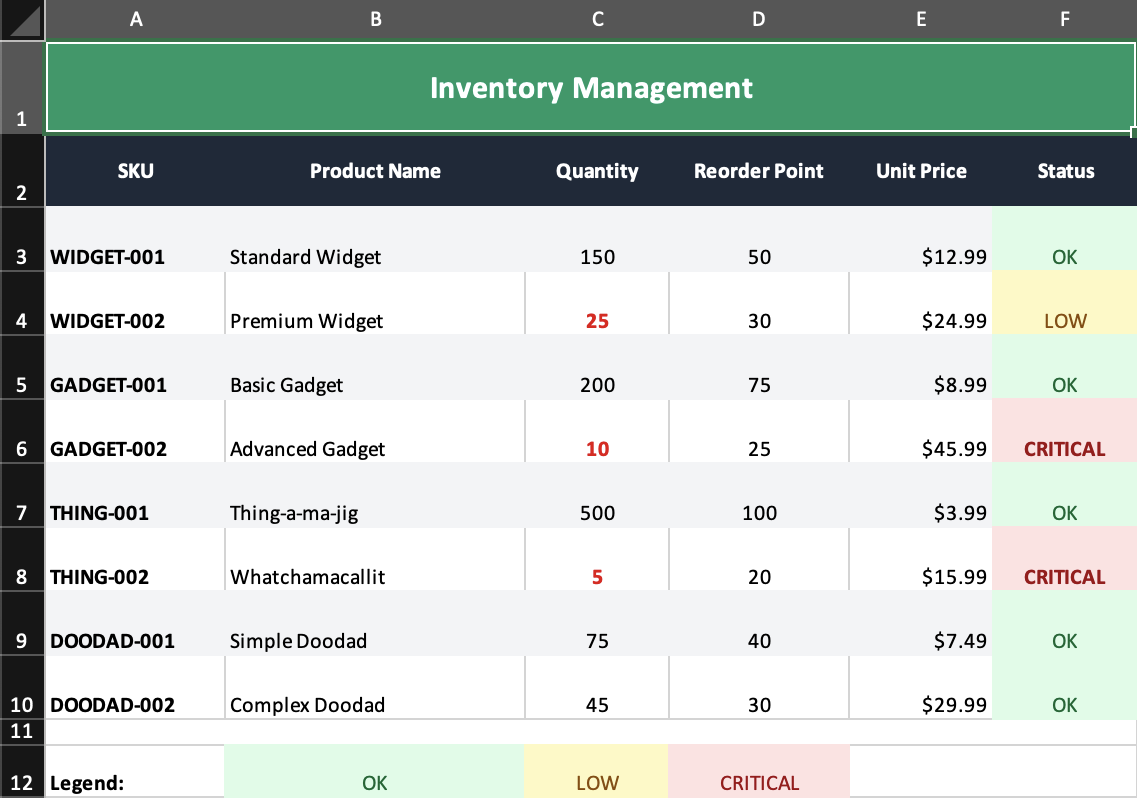
What it demonstrates
- a
Groupprocessor that adds zebra striping - value-driven status styling in normal JSX
- mixing processors with ordinary row and cell declarations
Why it matters
Processors let you keep repetitive or rule-based presentation logic out of your JSX tree and apply it at render time instead.
Source
examples/04-processors.tsx
/**
 * Processors Example - Custom Row/Cell Processing
 *
 * This example demonstrates how to use Processors to:
 * - Apply zebra striping (alternating row colors)
 * - Conditionally style cells based on values
 * - Transform data during rendering
 *
 * Processors are functions that receive a node and context,
 * and can return a modified node with different styles/values.
 *
 * Run: npm run example:processors (or pnpm/bun equivalent)
 */

import { writeFile } from 'node:fs/promises';
import { Cell, Column, Group, Row, Workbook, Worksheet } from '../src/components';
import { renderToWorkbook as render } from '../src/renderRows';
import type { AnyNode, Processor, ProcessorContext } from '../src/types';
import { isRow, mergeDeep } from '../src/utils';

/**
 * Zebra stripe processor - applies alternating background colors to rows
 */
const zebraStripeProcessor: Processor = (node: AnyNode, context: ProcessorContext) => {
  if (!isRow(node) || context.rowIndex === undefined) {
    return node;
  }

  if (context.rowIndex % 2 !== 0) {
    const newStyle = mergeDeep(node.props.style, {
      fill: {
        type: 'pattern',
        pattern: 'solid',
        fgColor: { argb: 'F3F4F6' }, // Light gray for odd rows
      },
    });
    return { ...node, props: { ...node.props, style: newStyle } };
  }
  return node;
};

// Sample inventory data
const inventory = [
  { sku: 'WIDGET-001', name: 'Standard Widget', quantity: 150, reorderPoint: 50, price: 12.99 },
  { sku: 'WIDGET-002', name: 'Premium Widget', quantity: 25, reorderPoint: 30, price: 24.99 },
  { sku: 'GADGET-001', name: 'Basic Gadget', quantity: 200, reorderPoint: 75, price: 8.99 },
  { sku: 'GADGET-002', name: 'Advanced Gadget', quantity: 10, reorderPoint: 25, price: 45.99 },
  { sku: 'THING-001', name: 'Thing-a-ma-jig', quantity: 500, reorderPoint: 100, price: 3.99 },
  { sku: 'THING-002', name: 'Whatchamacallit', quantity: 5, reorderPoint: 20, price: 15.99 },
  { sku: 'DOODAD-001', name: 'Simple Doodad', quantity: 75, reorderPoint: 40, price: 7.49 },
  { sku: 'DOODAD-002', name: 'Complex Doodad', quantity: 45, reorderPoint: 30, price: 29.99 },
];

// Helper to determine stock status style
function getStockStyle(quantity: number, reorderPoint: number): string {
  if (quantity <= reorderPoint * 0.5) {
    return 'bg-red-100 text-red-800 font-bold'; // Critical
  }
  if (quantity <= reorderPoint) {
    return 'bg-yellow-100 text-yellow-800'; // Low
  }
  return 'bg-green-100 text-green-800'; // Good
}

function getStockStatus(quantity: number, reorderPoint: number): string {
  if (quantity <= reorderPoint * 0.5) return 'CRITICAL';
  if (quantity <= reorderPoint) return 'LOW';
  return 'OK';
}

const workbook = (
  <Workbook>
    <Worksheet name="Inventory" properties={{ tabColor: { argb: '059669' } }}>
      {/* Column definitions */}
      <Column width={15} />
      <Column width={25} />
      <Column width={12} />
      <Column width={15} />
      <Column width={12} format='"$"#,##0.00' />
      <Column width={12} />

      {/* Title */}
      <Row height={35}>
        <Cell
          value="Inventory Management"
          colSpan={6}
          className="font-bold text-xl text-center align-center bg-emerald-600 text-white"
        />
      </Row>

      {/* Header Row */}
      <Row height={28}>
        <Group className="font-bold bg-gray-800 text-white text-center align-center">
          <Cell value="SKU" />
          <Cell value="Product Name" />
          <Cell value="Quantity" />
          <Cell value="Reorder Point" />
          <Cell value="Unit Price" />
          <Cell value="Status" />
        </Group>
      </Row>

      {/* Data rows with zebra striping via processor */}
      <Group processor={zebraStripeProcessor}>
        {inventory.map((item) => (
          <Row height={24}>
            <Cell value={item.sku} className="font-bold" />
            <Cell value={item.name} />
            <Cell
              value={item.quantity}
              className={
                item.quantity <= item.reorderPoint
                  ? 'text-red-600 font-bold text-center'
                  : 'text-center'
              }
            />
            <Cell value={item.reorderPoint} className="text-center" />
            <Cell value={item.price} />
            <Cell
              value={getStockStatus(item.quantity, item.reorderPoint)}
              className={`text-center ${getStockStyle(item.quantity, item.reorderPoint)}`}
            />
          </Row>
        ))}
      </Group>

      {/* Legend */}
      <Row height={10}>
        <Cell value="" colSpan={6} />
      </Row>

      <Row height={20}>
        <Cell value="Legend:" className="font-bold" />
        <Cell value="OK" className="bg-green-100 text-green-800 text-center" />
        <Cell value="LOW" className="bg-yellow-100 text-yellow-800 text-center" />
        <Cell value="CRITICAL" className="bg-red-100 text-red-800 text-center" />
        <Cell value="" colSpan={2} />
      </Row>
    </Worksheet>
  </Workbook>
);

render(workbook).then(async (wb) => {
  const buffer = await wb.xlsx.writeBuffer();
  await writeFile('examples/output/04-processors.xlsx', Buffer.from(buffer));
  console.log('✅ Created examples/output/04-processors.xlsx');
});