

Merged Cells Example
Preview
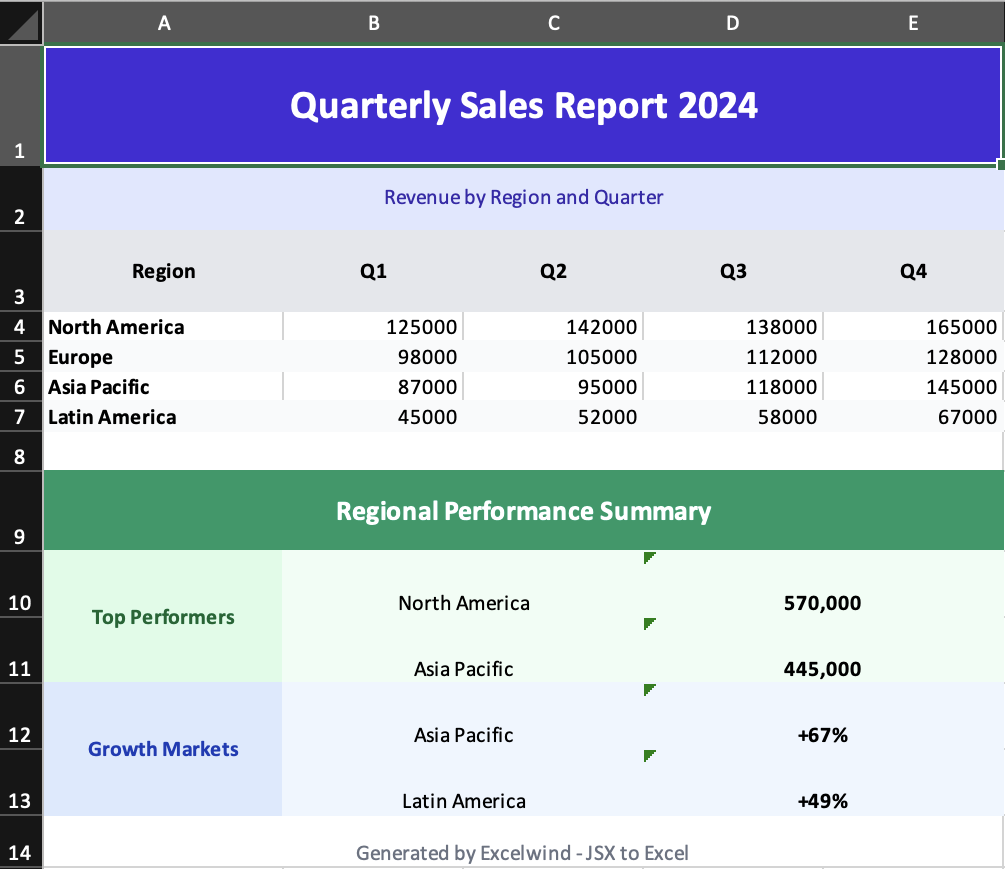
What it demonstrates
- full-width title and subtitle rows
- vertically merged labels for grouped sections
- mixed
rowSpanandcolSpansummary blocks - report-style layout without manual cell addressing
Why it matters
This is the clearest example of how Excelwind turns JSX structure into a non-trivial spreadsheet layout.
Source
examples/05-merged-cells.tsx
/**
 * Merged Cells Example - Cell Spanning
 *
 * This example demonstrates how to:
 * - Merge cells horizontally with colSpan
 * - Merge cells vertically with rowSpan
 * - Create complex table layouts
 *
 * Run: npm run example:merged (or pnpm/bun equivalent)
 */

import { writeFile } from 'node:fs/promises';
import { Cell, Column, Row, Workbook, Worksheet } from '../src/components';
import { renderToWorkbook as render } from '../src/renderRows';

const workbook = (
  <Workbook>
    <Worksheet name="Merged Cells Demo">
      {/* Column definitions */}
      <Column width={20} />
      <Column width={15} />
      <Column width={15} />
      <Column width={15} />
      <Column width={15} />

      {/* Title spanning all columns */}
      <Row height={45}>
        <Cell
          value="Quarterly Sales Report 2024"
          colSpan={5}
          className="font-bold text-2xl text-center align-center bg-indigo-700 text-white"
        />
      </Row>

      {/* Subtitle */}
      <Row height={25}>
        <Cell
          value="Revenue by Region and Quarter"
          colSpan={5}
          className="text-center align-center bg-indigo-100 text-indigo-800"
        />
      </Row>

      {/* Header row with quarters */}
      <Row height={30}>
        <Cell value="Region" className="font-bold bg-gray-200 text-center align-center" />
        <Cell value="Q1" className="font-bold bg-gray-200 text-center align-center" />
        <Cell value="Q2" className="font-bold bg-gray-200 text-center align-center" />
        <Cell value="Q3" className="font-bold bg-gray-200 text-center align-center" />
        <Cell value="Q4" className="font-bold bg-gray-200 text-center align-center" />
      </Row>

      {/* Data rows */}
      <Row>
        <Cell value="North America" className="font-bold" />
        <Cell value={125000} />
        <Cell value={142000} />
        <Cell value={138000} />
        <Cell value={165000} />
      </Row>

      <Row>
        <Cell value="Europe" className="font-bold bg-gray-50" />
        <Cell value={98000} className="bg-gray-50" />
        <Cell value={105000} className="bg-gray-50" />
        <Cell value={112000} className="bg-gray-50" />
        <Cell value={128000} className="bg-gray-50" />
      </Row>

      <Row>
        <Cell value="Asia Pacific" className="font-bold" />
        <Cell value={87000} />
        <Cell value={95000} />
        <Cell value={118000} />
        <Cell value={145000} />
      </Row>

      <Row>
        <Cell value="Latin America" className="font-bold bg-gray-50" />
        <Cell value={45000} className="bg-gray-50" />
        <Cell value={52000} className="bg-gray-50" />
        <Cell value={58000} className="bg-gray-50" />
        <Cell value={67000} className="bg-gray-50" />
      </Row>

      {/* Spacer */}
      <Row height={15}>
        <Cell value="" colSpan={5} />
      </Row>

      {/* Complex merged cell example */}
      <Row height={30}>
        <Cell
          value="Regional Performance Summary"
          colSpan={5}
          className="font-bold text-lg text-center align-center bg-emerald-600 text-white"
        />
      </Row>

      {/* Vertical merge example - Category spanning multiple rows */}
      <Row height={25}>
        <Cell
          value="Top Performers"
          rowSpan={2}
          className="font-bold bg-green-100 text-green-800 text-center align-center"
        />
        <Cell value="North America" colSpan={2} className="text-center bg-green-50" />
        <Cell value="570,000" colSpan={2} className="text-center font-bold bg-green-50" />
      </Row>

      <Row height={25}>
        {/* First cell is covered by rowSpan above */}
        <Cell value="Asia Pacific" colSpan={2} className="text-center bg-green-50" />
        <Cell value="445,000" colSpan={2} className="text-center font-bold bg-green-50" />
      </Row>

      <Row height={25}>
        <Cell
          value="Growth Markets"
          rowSpan={2}
          className="font-bold bg-blue-100 text-blue-800 text-center align-center"
        />
        <Cell value="Asia Pacific" colSpan={2} className="text-center bg-blue-50" />
        <Cell value="+67%" colSpan={2} className="text-center font-bold bg-blue-50" />
      </Row>

      <Row height={25}>
        {/* First cell is covered by rowSpan above */}
        <Cell value="Latin America" colSpan={2} className="text-center bg-blue-50" />
        <Cell value="+49%" colSpan={2} className="text-center font-bold bg-blue-50" />
      </Row>

      {/* Footer */}
      <Row height={20}>
        <Cell
          value="Generated by Excelwind - JSX to Excel"
          colSpan={5}
          className="text-center text-gray-500 text-sm"
        />
      </Row>
    </Worksheet>
  </Workbook>
);

render(workbook).then(async (wb) => {
  const buffer = await wb.xlsx.writeBuffer();
  await writeFile('examples/output/05-merged-cells.xlsx', Buffer.from(buffer));
  console.log('✅ Created examples/output/05-merged-cells.xlsx');
});