

Images Example
Preview
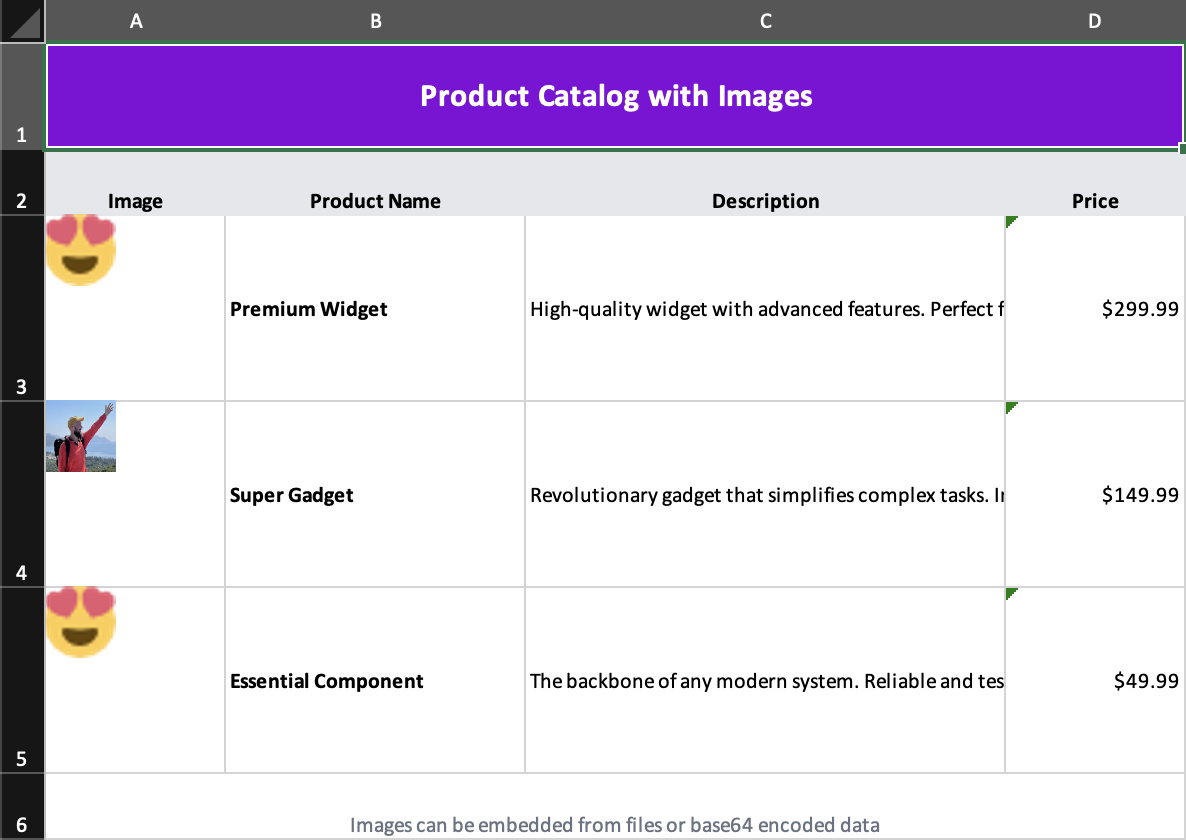
What it demonstrates
- base64-backed images
- file-backed images
- images nested inside cells
- explicit image positioning and sizing
Why it matters
This example shows that Excelwind can handle more than tabular data; it can produce branded or catalog-style spreadsheets too.
Source
examples/07-images.tsx
/**
 * Images Example - Embedding Images in Excel
 *
 * This example demonstrates how to:
 * - Embed images from files
 * - Embed images from base64 data
 * - Position and size images
 * - Add image tooltips
 *
 * Run: npm run example:images (or pnpm/bun equivalent)
 */

import { writeFile } from 'node:fs/promises';
import { Cell, Column, Image, Row, Workbook, Worksheet } from '../src/components';
import { renderToWorkbook as render } from '../src/renderRows';

// A small sample PNG image encoded as base64 (a simple icon)
const sampleBase64Image =
  'iVBORw0KGgoAAAANSUhEUgAAABgAAAAYCAYAAADgdz34AAAABHNCSVQICAgIfAhkiAAAAAlwSFlzAAAApgAAAKYB3X3/OAAAABl0RVh0U29mdHdhcmUAd3d3Lmlua3NjYXBlLm9yZ5vuPBoAAANCSURBVEiJtZZPbBtFFMZ/M7ubXdtdb1xSFyeilBapySVU8h8OoFaooFSqiihIVIpQBKci6KEg9Q6H9kovIHoCIVQJJCKE1ENFjnAgcaSGC6rEnxBwA04Tx43t2FnvDAfjkNibxgHxnWb2e/u992bee7tCa00YFsffekFY+nUzFtjW0LrvjRXrCDIAaPLlW0nHL0SsZtVoaF98mLrx3pdhOqLtYPHChahZcYYO7KvPFxvRl5XPp1sN3adWiD1ZAqD6XYK1b/dvE5IWryTt2udLFedwc1+9kLp+vbbpoDh+6TklxBeAi9TL0taeWpdmZzQDry0AcO+jQ12RyohqqoYoo8RDwJrU+qXkjWtfi8Xxt58BdQuwQs9qC/afLwCw8tnQbqYAPsgxE1S6F3EAIXux2oQFKm0ihMsOF71dHYx+f3NND68ghCu1YIoePPQN1pGRABkJ6Bus96CutRZMydTl+TvuiRW1m3n0eDl0vRPcEysqdXn+jsQPsrHMquGeXEaY4Yk4wxWcY5V/9scqOMOVUFthatyTy8QyqwZ+kDURKoMWxNKr2EeqVKcTNOajqKoBgOE28U4tdQl5p5bwCw7BWquaZSzAPlwjlithJtp3pTImSqQRrb2Z8PHGigD4RZuNX6JYj6wj7O4TFLbCO/Mn/m8R+h6rYSUb3ekokRY6f/YukArN979jcW+V/S8g0eT/N3VN3kTqWbQ428m9/8k0P/1aIhF36PccEl6EhOcAUCrXKZXXWS3XKd2vc/TRBG9O5ELC17MmWubD2nKhUKZa26Ba2+D3P+4/MNCFwg59oWVeYhkzgN/JDR8deKBoD7Y+ljEjGZ0sosXVTvbc6RHirr2reNy1OXd6pJsQ+gqjk8VWFYmHrwBzW/n+uMPFiRwHB2I7ih8ciHFxIkd/3Omk5tCDV1t+2nNu5sxxpDFNx+huNhVT3/zMDz8usXC3ddaHBj1GHj/As08fwTS7Kt1HBTmyN29vdwAw+/wbwLVOJ3uAD1wi/dUH7Qei66PfyuRj4Ik9is+hglfbkbfR3cnZm7chlUWLdwmprtCohX4HUtlOcQjLYCu+fzGJH2QRKvP3UNz8bWk1qMxjGTOMThZ3kvgLI5AzFfo379UAAAAASUVORK5CYII=';

const workbook = (
  <Workbook>
    <Worksheet name="Product Catalog">
      {/* Column definitions */}
      <Column width={15} />
      <Column width={25} />
      <Column width={40} />
      <Column width={15} />

      {/* Header */}
      <Row height={40}>
        <Cell
          value="Product Catalog with Images"
          colSpan={4}
          className="font-bold text-xl text-center align-center bg-purple-700 text-white"
        />
      </Row>

      {/* Column headers */}
      <Row height={25}>
        <Cell value="Image" className="font-bold bg-gray-200 text-center" />
        <Cell value="Product Name" className="font-bold bg-gray-200 text-center" />
        <Cell value="Description" className="font-bold bg-gray-200 text-center" />
        <Cell value="Price" className="font-bold bg-gray-200 text-center" />
      </Row>

      {/* Product 1 - Image from base64 */}
      <Row height={70}>
        <Cell value="">
          <Image
            buffer={sampleBase64Image}
            extension="png"
            position={{
              tl: { col: 0, row: 2 },
              ext: { width: 48, height: 48 },
            }}
            tooltip="Product thumbnail"
          />
        </Cell>
        <Cell value="Premium Widget" className="font-bold align-center" />
        <Cell
          value="High-quality widget with advanced features. Perfect for enterprise use."
          className="align-center text-nowrap"
        />
        <Cell value="$299.99" className="align-center text-right" />
      </Row>

      {/* Product 2 - Image from file (if exists) */}
      <Row height={70}>
        <Cell value="">
          <Image
            src="examples/assets/img.jpg"
            extension="jpeg"
            position={{
              tl: { col: 0, row: 3 },
              ext: { width: 48, height: 48 },
            }}
            tooltip="Gadget image"
          />
        </Cell>
        <Cell value="Super Gadget" className="font-bold align-center" />
        <Cell
          value="Revolutionary gadget that simplifies complex tasks. Industry leading performance."
          className="align-center text-nowrap"
        />
        <Cell value="$149.99" className="align-center text-right" />
      </Row>

      {/* Product 3 */}
      <Row height={70}>
        <Cell value="">
          <Image
            buffer={sampleBase64Image}
            extension="png"
            position={{
              tl: { col: 0, row: 4 },
              ext: { width: 48, height: 48 },
            }}
            tooltip="Component icon"
          />
        </Cell>
        <Cell value="Essential Component" className="font-bold align-center" />
        <Cell
          value="The backbone of any modern system. Reliable and tested."
          className="align-center text-nowrap"
        />
        <Cell value="$49.99" className="align-center text-right" />
      </Row>

      {/* Footer */}
      <Row height={25}>
        <Cell
          value="Images can be embedded from files or base64 encoded data"
          colSpan={4}
          className="text-center text-gray-500 text-sm"
        />
      </Row>
    </Worksheet>
  </Workbook>
);

render(workbook).then(async (wb) => {
  const buffer = await wb.xlsx.writeBuffer();
  await writeFile('examples/output/07-images.xlsx', Buffer.from(buffer));
  console.log('✅ Created examples/output/07-images.xlsx');
});