

Complex Merge Example
Preview
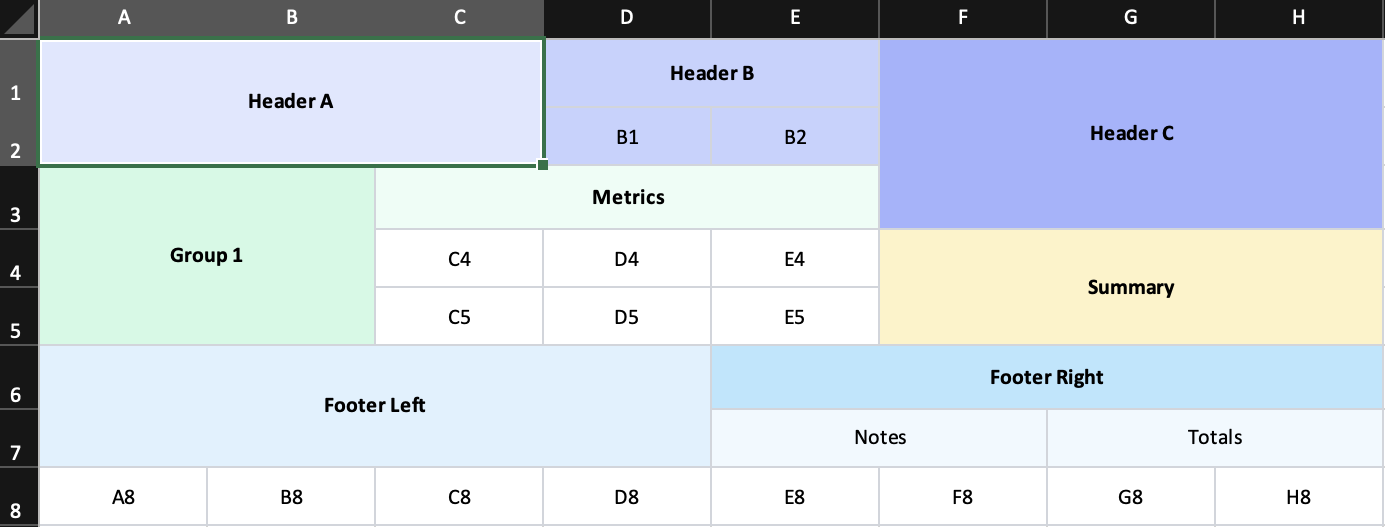
What it demonstrates
- multiple merge regions sharing the same worksheet
- overlapping row-span and column-span constraints
- consistent styling across complex merged sections
- a useful regression layout for merge behavior
Why it matters
If you are building dashboards, planning boards, or matrix-like reports, this is the example that most closely reflects the hard edge cases.
Source
examples/08-complex-merge.tsx
/**
 * Complex Merge Example - Mixed Row/Column Spans
 *
 * This example stresses mixed row/column merges in one sheet.
 * Run: npm run example:complex-merge (or pnpm/bun equivalent)
 */

import { writeFile } from 'node:fs/promises';
import { Cell, Column, Row, Workbook, Worksheet } from '../src/components';
import { renderToWorkbook as render } from '../src/renderRows';

const cellClass = 'border border-gray-300 text-center align-center';

const workbook = (
  <Workbook>
    <Worksheet name="Complex Merge">
      <Column width={14} />
      <Column width={14} />
      <Column width={14} />
      <Column width={14} />
      <Column width={14} />
      <Column width={14} />
      <Column width={14} />
      <Column width={14} />

      <Row height={26} className={cellClass}>
        <Cell value="Header A" colSpan={3} rowSpan={2} className="bg-indigo-100 font-bold" />
        <Cell value="Header B" colSpan={2} className="bg-indigo-200 font-bold" />
        <Cell value="Header C" colSpan={3} rowSpan={3} className="bg-indigo-300 font-bold" />
      </Row>

      <Row height={22} className={cellClass}>
        <Cell value="B1" className="bg-indigo-200" />
        <Cell value="B2" className="bg-indigo-200" />
      </Row>

      <Row height={24} className={cellClass}>
        <Cell value="Group 1" colSpan={2} rowSpan={3} className="bg-emerald-100 font-bold" />
        <Cell value="Metrics" colSpan={3} className="bg-emerald-50 font-bold" />
      </Row>

      <Row height={22} className={cellClass}>
        <Cell value="C4" />
        <Cell value="D4" />
        <Cell value="E4" />
        <Cell value="Summary" colSpan={3} rowSpan={2} className="bg-amber-100 font-bold" />
      </Row>

      <Row height={22} className={cellClass}>
        <Cell value="C5" />
        <Cell value="D5" />
        <Cell value="E5" />
      </Row>

      <Row height={24} className={cellClass}>
        <Cell value="Footer Left" colSpan={4} rowSpan={2} className="bg-sky-100 font-bold" />
        <Cell value="Footer Right" colSpan={4} className="bg-sky-200 font-bold" />
      </Row>

      <Row height={22} className={cellClass}>
        <Cell value="Notes" colSpan={2} className="bg-sky-50" />
        <Cell value="Totals" colSpan={2} className="bg-sky-50" />
      </Row>

      <Row height={22} className={cellClass}>
        <Cell value="A8" />
        <Cell value="B8" />
        <Cell value="C8" />
        <Cell value="D8" />
        <Cell value="E8" />
        <Cell value="F8" />
        <Cell value="G8" />
        <Cell value="H8" />
      </Row>
    </Worksheet>
  </Workbook>
);

render(workbook).then(async (wb) => {
  const buffer = await wb.xlsx.writeBuffer();
  await writeFile('examples/output/08-complex-merge.xlsx', Buffer.from(buffer));
  console.log('✅ Created examples/output/08-complex-merge.xlsx');
});