

Basic Example
Preview
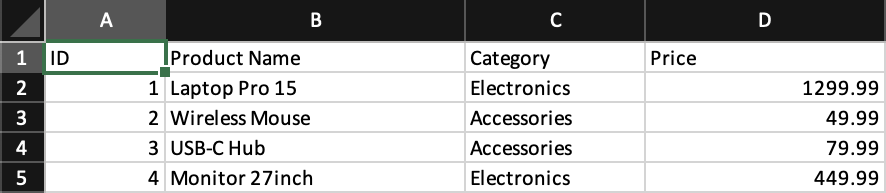
What it demonstrates
- workbook and worksheet structure
- column widths
- plain rows and cells
- writing a generated workbook to disk
Why it matters
This is the shortest path from JSX to a valid .xlsx file. Use it as the starting point for new projects or when debugging larger layouts.
Source
examples/01-basic.tsx
/**
 * Basic Example - Getting Started with Excelwind
 *
 * This example demonstrates the fundamental building blocks:
 * - Creating a Workbook
 * - Adding Worksheets
 * - Defining Columns
 * - Adding Rows and Cells
 *
 * Run: npm run example:basic (or pnpm/bun equivalent)
 */

import { writeFile } from 'node:fs/promises';
import { Cell, Column, Row, Workbook, Worksheet } from '../src/components';
import { renderToWorkbook as render } from '../src/renderRows';

const workbook = (
  <Workbook>
    <Worksheet name="Getting Started">
      {/* Define column widths */}
      <Column width={10} />
      <Column width={25} />
      <Column width={15} />
      <Column width={20} />

      {/* Header row */}
      <Row>
        <Cell value="ID" />
        <Cell value="Product Name" />
        <Cell value="Category" />
        <Cell value="Price" />
      </Row>

      {/* Data rows */}
      <Row>
        <Cell value={1} />
        <Cell value="Laptop Pro 15" />
        <Cell value="Electronics" />
        <Cell value={1299.99} />
      </Row>
      <Row>
        <Cell value={2} />
        <Cell value="Wireless Mouse" />
        <Cell value="Accessories" />
        <Cell value={49.99} />
      </Row>
      <Row>
        <Cell value={3} />
        <Cell value="USB-C Hub" />
        <Cell value="Accessories" />
        <Cell value={79.99} />
      </Row>
      <Row>
        <Cell value={4} />
        <Cell value="Monitor 27inch" />
        <Cell value="Electronics" />
        <Cell value={449.99} />
      </Row>
    </Worksheet>
  </Workbook>
);

// Render and save the workbook
render(workbook).then(async (wb) => {
  const buffer = await wb.xlsx.writeBuffer();
  await writeFile('examples/output/01-basic.xlsx', Buffer.from(buffer));
  console.log('✅ Created examples/output/01-basic.xlsx');
});
Key APIs used
WorkbookWorksheetColumnRowCellrender