

Group
<Group> is a powerful container that can:
- apply shared styles (
classNameorstyle) to nested rows/cells - run a processor over rows/cells
- create named ranges for formula use
<Group className="bg-gray-100" processor={zebraStripe}> <Row>...</Row> <Row>...</Row></Group>Style propagation
classNameandstyleon a group are merged into all descendant rows/cells.- This makes it easy to set section backgrounds, fonts, or borders in one place.
Processors
- A group can accept a
processorto transform rows/cells during render. - Useful for zebra striping, conditional styling, or data-driven transforms.
Named ranges
- If a
Grouphas anid, Excelwind creates a named range spanning all rows rendered inside that group. - The range covers the full row width from column A to the last column on the sheet.
- This enables formulas like
SUM(MyGroup)orCOUNT(MyGroup)against the grouped block.
Notes
- Groups can be nested.
- Groups can appear inside rows to style a subset of cells.
Example
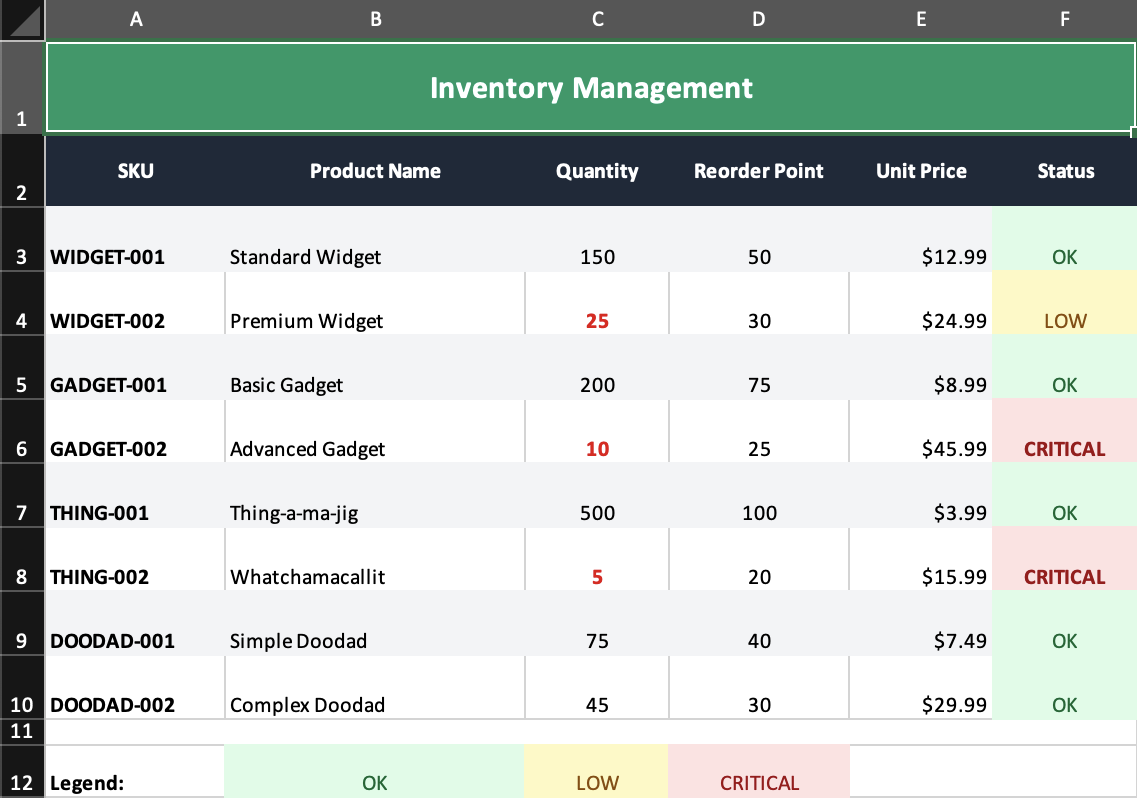
examples/04-processors.tsxuses aGroupprocessor for zebra striping and shared styling across an inventory table.